

Hello friend! I am so glad you are here. If you are asking yourself, how do I become a video editor, you are in the right place. Maybe you saw a funny clip on your phone. Or maybe you love watching big movies. Whatever it is, you want to make videos too. And guess what?
You really can! You do not need a big fancy office or a very expensive degree. You just need a bit of time and a lot of heart.
In this easy video editing guide, we are going to walk through everything. We will look at what editing is. We will look at the tools you need. We will even talk about how to make money. It might feel like a lot right now, but we will take it one step at a time. It is like building a house with blocks. We just put one block on top of another.
Table of Contents
You Should Understand All About Basic Video Editing Skills
So, let’s start at the beginning. When you are super excited to be a video editor. Your head is probably spinning with a lot of questions. As a beginner, it is totally normal to feel a bit worried or unsure. In this basic intro, I am going to answer those common questions. You are thinking about so you can stop stressing and start creating!
What is video editing anyway? Imagine you went to a birthday party. You took ten small videos on your phone. Some are blurry. Some have someone coughing. Video editing is when you take those clips and pick the best parts. You put them in a line so they tell the story of the party. You add some happy music. You put a “Happy Birthday” sign on the screen. That is it! That is editing. It is taking raw pieces and making something special.
Why Should I Become a Video Editor?
You might wonder if this is a good job. The answer is a big yes! Look around you. Everyone is watching videos. People watch them on YouTube. They watch them on TikTok. Businesses use them to sell things. Because there are so many videos, people need editors. AIDirectors To Faceless Video Marketing No Editing Skills In 2026
It is also a very free job. You can work from your bedroom. You can work in a coffee shop. If you have your laptop, you have your office. Plus, it is fun! You get to be creative every single day. You get to play with colors and sounds. And as you get better, the pay gets much better too.
Who Can Become a Video Editor?
I have good news. Anyone can do this. You do not have to be a math genius. You do not have to be a great artist.
- Are you a student looking for a side job? You can do this.
- Are you looking for a new career? You can do this.
- Are you a stay-at-home mom or dad? You can do this.
Your age does not matter. It does not matter what you studied in school. If you can use a computer and you are willing to practice, you are ready.
Where Do Video Editors Work?
There are so many places! Some editors work for big YouTube stars. Some work for companies that make ads. Others work on freelance sites like Fiverr or Upwork. You could even work for a news station or a movie studio one day. The world is full of screens, and every screen needs an editor.
How Do I Become a Video Editor? (The Basic Plan)
If you want to start today, here is the simple plan.
- Learn the basics: Watch some videos on how to cut clips.
- Get a software: Pick a simple tool to start with.
- Practice: This is the big one. Edit something every day.
- Make a Portfolio: Keep your best work in one place to show people.
- Start Small: Take a tiny job for a friend or a local shop.
Is it hard? At first, any new thing feels a bit weird. You might get confused by all the buttons. But after a few days, it feels like riding a bike. Most editing tools today are just “drag and drop.” You pick a clip with your mouse and move it. Simple!
And don’t worry about expensive gear. If your laptop can play a movie without freezing, it can probably edit a simple video. You can even start on your phone! It takes about 2 to 4 weeks to get the hang of the basics. If you stick with it for 3 months, you will be surprised at how good you become.
The Must-Have Skills For Every Professional Video Editor
Now that we know the basics, let’s talk about skills. To be a good editor, you need a mix of “computer skills” and “people skills.”
Technical Skills
The main thing you need to know is how to use a timeline. A timeline is just a long bar where you lay out your clips. You need to know how to “cut” (remove a part) and “trim” (make a part shorter). Once you can move clips around easily, you have the main technical skill down.
Creative Skills: Telling the Story
This is where the magic happens. A good editor knows about “pacing.” Pacing is like the heartbeat of a video. If it is an action video, the cuts should be fast. If it is a sad video, the cuts should be slow. You have to feel the rhythm. It is a bit like dancing but with your eyes.
Audio Basics
Did you know that sound is more important than the picture? It’s true! If a video looks a bit blurry, people might still watch it. But if the sound is scratchy or too loud, people will turn it off right away. You need to learn how to keep the voices clear and the background music at the right level.
Color and Visuals
You don’t need to be a painter. But you should know what looks “nice.” Sometimes a video looks too dark or too yellow. You can fix that! Making the colors look bright and real makes a huge difference.
Soft Skills: Being a Nice Person
You will often work with other people. They will give you “feedback.” This means they might tell you, “Hey, can you change this part?” You need to be patient. You need to talk clearly. Being easy to work with is a skill that will get you more jobs than anything else.
The Easiest Video Editing Software to Master in a Week
Imagine you are a carpenter. You need a hammer and a saw to build a chair. In video editing, your software is your hammer. People always ask, “Which one should I buy?” My answer is always: start with what is easy and free.
Free vs. Paid Video Editing Software
There are two kinds of tools. Some cost a lot of money every month. Others are totally free.
- Free Tools: These are great for learning. CapCut is very popular right now. It is easy to use on a phone or a computer. DaVinci Resolve is another one. It is actually professional software, but they give a huge version away for free!
- Paid Tools: Adobe Premiere Pro is the big name. Most big companies use it. It has a lot of buttons, which can be scary at first. Final Cut Pro is great if you use a Mac computer.
The Laptop vs. Desktop Debate
Do you need a super-fast computer? Not on day one. If you are asking how do I become a video editor without spending thousands of dollars, here is the secret: use what you have.
- Laptop: Great because you can edit at the park or in bed. Just make sure it doesn’t get too hot!
- Desktop: Usually faster for the same price. It is better for big, long movies.
- Mobile Editing: You can edit entire TikToks on your phone. It is a great way to learn the feel of cutting clips while you are sitting on the bus.
Which One Should You Choose?
If you are a total beginner, try CapCut Desktop. It feels like a game. It is easy to drag things around. Once you feel like you have “outgrown” it, move to DaVinci Resolve or Premiere Pro.
Learning advanced video editing and Experiments: How to Get Good Fast
Okay, you have your software. Now what? You can’t just stare at the screen. You have to play!
Where Do I Learn?
YouTube is the world’s best school. Just search for “Beginner tutorial for [your software name].” Don’t watch ten hours of videos in a row. Watch ten minutes, then try it yourself. That is the only way it sticks in your brain.
Beginners Video editing practice online Plan
If you have just 30 minutes a day, you can learn how to edit. You don’t need to make a perfect movie. You just need to try one small thing each day. Here is a simple plan to get you started:
| Day | What to Do | Why It’s Important |
| Monday | Import a Video | This is how you bring your clips into the software to start work. |
| Tuesday | Cut a Clip | This helps you throw away boring parts and keep the fun ones. |
| Wednesday | Add Some Text | Now you can say “Hello!” or share a title on the screen. |
| Thursday | Add Music | Music makes people feel happy or excited when they watch. |
| Friday | The Big Mix | Put it all together! Make a tiny 10-second movie. |
The Weekend Challenge!
Now that you have practiced the basics, it is time for your first big mission!
The Challenge: Take your phone and record yourself making a sandwich or pouring a glass of juice. Use everything you learned this week to make a 30-second video. Add a title like “My Tasty Snack,” put some fun music in the back, and cut out the parts where nothing is happening.
Once you are done, show it to your family or a friend. You are officially a video editor now!
10 Smart Experiments to Try
To get fast, you have to experiment. Try these “mini-missions”:
- Style Swap: Take a video of you making tea. Edit it once like a fast action movie. Then edit it again like a slow, peaceful dream.
- The Short Cut: Take a 5-minute video and try to make it 30 seconds without losing the story.
- Music Mood: Put scary music under a video of a puppy. See how it feels!
- Subtitle Test: Add captions to a video and see if it makes it easier to watch without sound.
- Fast vs. Slow: Practice making “Jump Cuts” where things happen very quickly.
- The Hook: Try to make the first 3 seconds so interesting that you can’t look away.
- Color Fix: Make a dull, grey video look bright and sunny.
- Match Cut: Try to make one clip transition into another perfectly.
- The Silent Movie: Try to tell a story using zero words—just clips and music.
- The 30-Minute Challenge: Set a timer. Try to finish a whole edit before it beeps. This teaches you to stop over-thinking!
Building Video Editing Portfolio and Finding Work
Now you have some skills. But how do you get people to pay you? You need a portfolio. A portfolio is just a way to say, “Look at what I can do!”
How to Create a Portfolio with Zero Clients
You might be thinking, “How do I show people I am good if no one has hired me yet?” This is what people call the “chicken and egg” problem. You need a job to get a portfolio, but you need a portfolio to get a job!
Don’t let that stop you. The secret is simple: Just make it up! You don’t need a boss to tell you to edit. Here are three easy ways to build a portfolio from scratch:
- 1. Edit for Yourself (Be Your Own Boss!) Take your phone and go outside. Record your dog running in the park, your brother playing a game, or even yourself cooking a meal. Take those clips and edit them into a “Life Vlog” or a “Mini Movie.”
- Pro Tip: People love to see “Before and After” videos. Show them the messy clips first, then show them the beautiful edited version. It proves you have “magic” hands!
- 2. Be a Volunteer Hero There are many people who need help but don’t have much money. Think about a local animal shelter, a small church, or even your friend’s new YouTube channel.
- What to do: Ask them, “Hey, can I edit one short video for you for free?”
- Why it works: Most people will say yes! Now you have a real project for a real person to put in your portfolio. Plus, it feels good to help!
- 3. Use “Stock Footage” for Fake Ads There are websites like Pexels or Pixabay that give away free video clips. You can download a clip of a cool running shoe or a beautiful beach.
- The Mission: Act like a big company hired you. Make a 15-second “Fake Commercial” for a shoe brand or a travel agency.
- The Result: When a future client sees it, they won’t care that the company didn’t pay you. They will only see that you know how to make things look expensive and professional!
Where to Find Your First Job
This is the most exciting part! Once you have a few videos ready, it’s time to find someone to pay you. If you are asking, “How Do I Become a Video Editor and get paid?” you have to start small. Don’t worry about big TV stations yet.
Here is how you can find your very first client:
Use Freelance Websites
There are websites where people go just to find helpers.
- Fiverr: This is like a big online shop. You post a “Gig” saying, “I will edit your video for $10.” It is a great place for beginners to get their first few stars.
- Upwork: This is a bit more like a job board. People post what they need, and you send them a message telling them why you are the best person for the job. It’s a good way to see what kind of videos are popular right now.
- Indeed: Most people think this is only for big office jobs, but you can search for “Junior Video Editor” or “Remote Video Editor.” Sometimes small companies look for helpers here too!
Be a Social Media Detective
Go to YouTube or Instagram and find creators who are just starting to get famous.
- The “Nice Message” Trick: Send them a friendly DM or email. Say, “Hi! I love your videos about [Topic]. I am a new editor and I would love to help you edit one video for free (or for a low price) to show you what I can do.” * Many busy creators are tired of editing and would love the help!
Look Right Next to You
Sometimes your first job is sitting at your dinner table!
- Friends and Family: Does your aunt have a small shop? Does your friend want to be a famous gamer?
- Ask them if they need a video for their business or a “highlight reel” for their game. They already trust you, so it is much easier to say yes!
Common Mistakes to Avoid (The “Don’t Do This” List)
- Too many effects: Beginners love flashy transitions. Pros keep it clean.
- Bad Audio: Never let the music drown out the talking.
- Missing Deadlines: If you say it will be done Friday, do not finish it Saturday.
- No Backups: Computers crash. Always save your work in two places.
- Wrong Export Settings: Don’t send a tiny, blurry video to a client.
- Ignoring Feedback: If a client asks for a change, don’t get mad. It’s part of the job.
- Copyright Music: Don’t use famous songs without permission, or the video might get taken down.
Video Editing Earn Money Online and The Pro Routine
If you are asking how do I become a video editor, you probably want to know how much you can earn. The truth is, it varies. Some people do this for fun on the side. Others do it as a full-time career.
You can start Faceless Video Marketing No Editing Skills In 2026
How Video Editors Earn Money
There are a few main ways to earn money:
- Freelancing: This is where you work for many different people. You might edit a wedding video one week and a toy commercial the next. You use sites like Fiverr, Upwork, or even Instagram to find these people.
- Full-Time Jobs: Some companies have their own video teams. You go to an office (or work from home) and get a steady paycheck every month.
- YouTube & Social Media: Many editors work solely for one big YouTuber. As the channel grows, your pay grows too.
- Specialization: This is when you become “The Guy” for one specific thing. Maybe you only edit real estate videos. Because you are an expert at that one thing, you can charge more money.
Beginner vs. Professional: The Real Difference
It is not just about being faster. It is about a change in how you think. Let’s look at this simple table to see the difference.
| Topic | Beginner Editor | Professional Editor |
| Main Focus | Finding the right buttons | Keeping the viewer watching |
| Style | Lots of flashy effects | Clean and clear storytelling |
| Speed | Slow and over-thinks | Fast and has a system |
| Feedback | Takes it personally | Uses it to make the video better |
| Audio | Often forgets to fix it | Makes it a top priority |
| Income | Random and small | Stable and grows over time |
The Professional Work Routine
A lot of people think editors just sit and play with videos all day. But pros have a routine. This helps them stay fast and not get burned out.
The Daily Time Split (For Growth):
- 20% Learning: Watch a new tutorial or try a new tool.
- 40% Practice: Work on your own projects to stay sharp.
- 25% Real Work: Edit videos for your actual paying clients.
- 15% Networking: Talk to people in forums and social media.
Using Video Editing Forum Free To Get Jobs
This is a secret tip. Don’t just go to job sites. Go to “Forums” like Reddit, Discord, or Facebook Groups for creators.
- Don’t spam: Don’t just post “Hire me!” No one likes that.
- Be helpful: If someone asks, “How do I make my text look better?”, give them a helpful answer.
- Build Trust: When people see you are helpful and know your stuff, they will naturally want to work with you. A single good comment can lead to a client who stays with you for years.
How Much Type Of Video editing: What Kind of Editor Will You Be?
As you get better, you might realize you like one type of video more than others. That is great! In the world of editing, we call this specializing. It is like being a doctor who only works on hearts or a chef who only makes pizza. When you are an expert at one thing, people pay you more!
Here are the main paths you can take:
YouTube Long-form (The Storyteller)
This is for videos that are 10, 20, or even 30 minutes long. Your job is to make sure people don’t get bored.
- The Trick: You use things like “B-roll” (extra clips of what the person is talking about) and funny memes or jokes. It’s all about keeping the viewer watching until the very end.
Short-Form: Reels, TikTok, and Shorts (The Fast Lane)
This is the fastest-growing job right now! These videos are very short, usually under 60 seconds.
- The Trick: You have to be super fast. You use big, colorful captions that pop up on the screen and cool sound effects. If you love fast music and high energy, this is for you!
Commercials & Ads (The Sales Hero)
These are short videos meant to help a business sell a toy, a shoe, or a service.
- The Trick: Every single second counts here. You have to make the product look amazing. These jobs often pay the most money because you are helping the business make money!
Podcast Editing (The Conversation Master)
Have you seen videos of two people talking with microphones? That’s a podcast!
- The Trick: You take a long talk and make it look clean. You switch between the person talking and the person listening. You also cut out the “umms” and “ahhs” to make them sound smart.
Real Estate (The House Helper)
Real estate editors make houses look like dream homes.
- The Trick: You use bright colors and smooth music to show off the kitchen and the backyard. Since people are always buying and selling houses, this is a very steady way to make money.
AI-Assisted Editing (The Future)
This is the newest path! You use smart AI tools to do the “boring” work for you.
- The Trick: The AI can help add subtitles or cut out the quiet parts where no one is talking. This lets you spend more time being creative and less time doing chores on your computer.
The World Value of Your New Skill
I want to remind you why this is so important. By the year 2026, almost all the traffic on the internet will be video. Every business—from the small bakery on your street to big tech companies—needs a video editor.
When you learn how do I become a video editor, you are learning a skill that cannot be easily replaced. Even with AI, we still need a human to say, “This part feels emotional,” or “This part is funny.” AI doesn’t have a heart, but you do.
Key Statistics from the Last 10 Years:
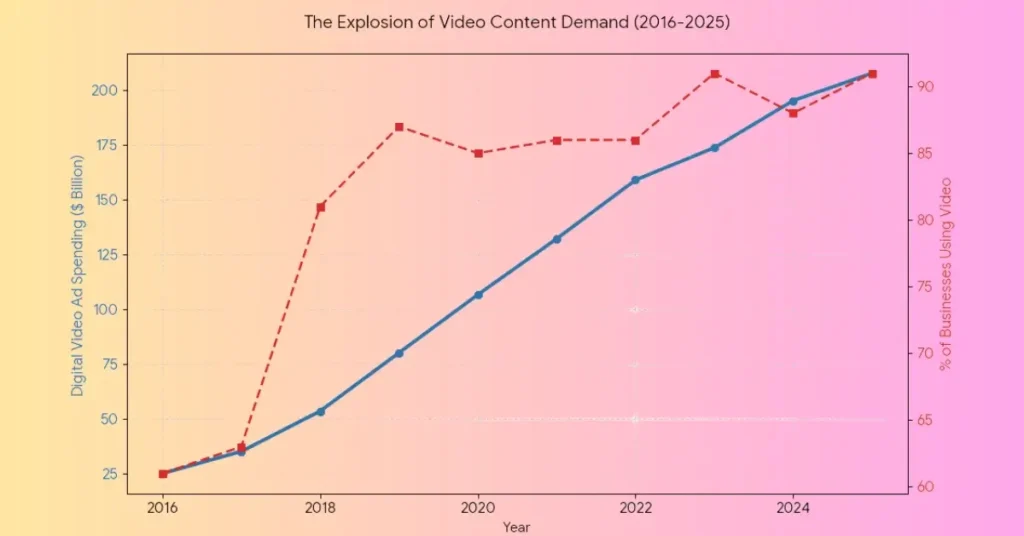
- Ad Spending: In $2017, companies spent about $35 billion on video ads. By $2025, that number is expected to pass $207 billion! That is more than a $500 increase in money flowing into the video industry.
- Business Adoption: In $2016, only about $61% of businesses used video as a marketing tool. Today, over $91 of businesses use video to reach their customers.
- Internet Traffic: Video now makes up over $82 of all internet traffic. Almost everything we do online learning, shopping, and playing revolves around video.
Why This is Good News for You:
This growth means there are millions of new “clients” every year. From small YouTubers to giant corporations, everyone needs someone who knows how to cut, trim, and tell a story. You are starting your journey at the perfect time!
Data Summary Table: I have created a table showing this growth. You can see how both the money spent and the number of businesses using video have gone up together. Source HubSpot’s
| Year | Video Ad Spending ($ Billion) | % of Businesses Using Video |
| 2016 | $25 | $61% |
| 2018 | $53 | $81% |
| 2020 | $106 | $85% |
| 2022 | $158 | $86% |
| 2024 | $195 | $88% |
| 2025 | $207 | $91% |
Is it Better Than Other Skills?
Some people learn coding or data science. Those are great too! But video editing is special because you can start seeing results very quickly. You don’t need to learn a whole new language. You just need to learn how to tell a story with pictures and sound.
How Video Editing Compares to Other Jobs
You might be wondering if you should learn something else instead. Let’s look at how video editing compares to other popular online jobs.
| Job Name | How Hard is it to Start? | Do People Want This? |
| Video Editing | Easy to Medium | Very, Very High |
| Graphic Design | Easy | High |
| Web Development | Hard | Very High |
| Writing Blogs | Easy | Medium |
| Social Media Manager | Easy | High |
| Computer Coding | Very Hard | Very High |
| Data Entry | Very Easy | Low |
| Virtual Assistant | Easy | High |
| App Developer | Hard | High |
| Online Teacher | Medium | Medium |
Why Video Editing is the “Sweet Spot”
As you can see in the table, Video Editing is in a very special place.
- It is easier to learn than building a whole website or coding an app.
- But, it has much higher demand than just typing data or writing simple notes.
In 2026, almost everything on the internet is moving toward video. This means while other jobs might get quiet, video editors will stay very busy!
As you can see, video editing is in that “sweet spot.” It is easy enough to start this month, but valuable enough to pay your bills for years.
Conclusion: Your Journey Starts Now
We have covered a lot today, haven’t we? We talked about what editing is, the tools you need, how to practice, and how to find work. If you are still asking how do I become a video editor, the answer is simple: Start.
Don’t wait until you have a better computer. Don’t wait until you feel “ready.” No one ever feels 100% ready. Just download a free app today. Take a video of your cat or your breakfast. Cut it. Add some music. Share it with a friend.
Every pro you see today started exactly where you are. They were confused by the buttons. They made videos that looked a bit messy. But they didn’t stop. They practiced, they made mistakes, and they learned.
Video editing is a journey of a thousand cuts. Just make the first one today. You have the heart for it, and the world is waiting to see your stories.
Good luck, friend. I know you can do it!
(FAQ) Frequently Asked Questions: All About Video Editing A to Z
What is a video editing tool?
Think of a video editing tool like a digital workbench. It is a computer program or app that lets you take raw video clips and put them together. You can use it to cut out mistakes, add music, and place words on the screen.
What is a video editing tool?
Think of a video editing tool like a digital workbench. It is a computer program or app that lets you take raw video clips and put them together. You can use it to cut out mistakes, add music, and place words on the screen.
Is Canva good for video editing?
Yes, for simple stuff! Canva is wonderful if you want to make a quick video for Instagram, a school project, or a birthday card. It is very easy to drag and drop things. However, if you want to make a long movie with many layers and complex effects, you might find it a bit too basic.
Can you teach yourself to edit videos?
Absolutely! Almost every great editor you see on YouTube today taught themselves. With free tutorials on YouTube and lots of practice, you can learn everything you need. You don’t need a teacher; you just need curiosity and time.
How do I start learning video editing?
The best way to start is to just do it!
1. Record a short video of your cat or your lunch.
2. Download a free app like The Capcut.
3. Try to cut the video, add a title like “My Lunch,” and put a happy song behind it.
What is the 80/20 rule in video editing?
This is a “secret” trick for editors! The 80/20 rule (also called the Pareto Principle) says that 20% of your work creates 80% of the results.
In editing, this means focusing on the most important things first—like good sound and clean cuts.
Don’t spend hours on a tiny 1-second special effect. If the story and the sound are good, people will love the video!

Comments are closed.